Complete Order Flow Edge: Pack 1 + Pack 2 + Pack 3 + Pack 4 Complete Order Flow Edge: Pack 1 + Pack 2 + Pack 3 + Pack 4 Complete Order Flow Edge: Pack 1 + Pack 2 + Pack 3 + Pack 4
Monthly
Yearly
Lifetime
COPY INSTRUCTIONS
copy
PREPARE FOR CLEAN NT8 INSTALLATION
What to do with existing NinjaTrader indicators, templates, cache, and other files:
If you want to save your pre-installed indicators, please follow the recommendations below:
1) Back up your NinjaTrader account.
2) Make a copy of Documents/NinjaTrader8/ folder with a different name.
3) Uninstall all other 3rd-party indicators possible. You may reinstall them later, restore them from backup, or from a copy.
4) Clean up your database, cache, and temporary folders inside Documents\NinjaTrader8\
5) For the best practice, altogether remove the NinjaTrader app via Windows/ Apps/ Uninstall
6) Double check if you have files inside C:\Users\username\Documents\NinjaTrader 8 and completely remove the foder\ NinjaTrader8\ . Make sure you don't have any previous files or any files inside Documents/ NinjaTrader 8/, and delete this folder completely.
end copy
====
PRE-REQUIREMENTS COPY
3) Remove OneDrive/ This is a NinjaTrader Requirement.
4) Whitelist NinjaTrader and BOF files in your Antivirus security system. Please make sure you also whitelisted/ excluded NT and BOF files on Windows Defender.
5) Remove Duplicate files https://bestorderflow.com/userguide/fix-problems-errors/6-4-uninstall-duplicate-files
6) Check NinjaTrader Version: Use the latest NinjaTrader version 8.1.5.1 or 8.1.5.2 and avoid 8.1.6.0 versions.
7) Prepared a CLEAN NinjaTaredr 8 free from other indicators. ( if you want to receive free support and error-free BOF indicators installation out of the box)
COPY INSTALLATION STEPS
Steps for perfect and errorless BOF indicators installation:
1) After the NinjaTrader platform is completely uninstalled, via Windows App uninstall,
2) Download and install the 8.1.5.1 or 8.1.8.2 version of NinjaTrader from NinjaTrader.com. Avoid 1.8.6.0 version.
3) Add your Machine ID to your Account page on bestorderflow.com and tab Machine ID. Use instructions from here: https://bestorderflow.com/userguide/install-uninstall-error-troubleshoot-ninjatrader/add-machine-id-for-ninjatrader
4) Double-check that your NinjaTrader Username is entered correctly: https://bestorderflow.com/userguide/install-uninstall-error-troubleshoot-ninjatrader/username-ninjatrader
5) Set your NinjaPlatform to start as Administrator. Must start NT only as Administrator. This is a must every time you log in.
6) PACK 1, 2, and 3 INDICATORS INSTALLATION
A) Must activate Platform Settings: Multiprovider and Tick Replay https://bestorderflow.com/userguide/how-to-prepare-nt8-platform/must-activate-settings-for-ninjatrader
Support Preparation steps:
Before approaching the BOF administrator for any help and assistance, please consider the preparation steps:
1) Turn off all Ninjatrader connections
2) Close the NinjaTrader platform
2) Use NToptimizer to clean up cache and all recorded/written historical files and data with errors and hiccups. The NT optimizer is a free Windows application that can be downloaded from your account on bestorderflow.com.
3) Start NinjaTrader as Administrator
4) If you have MBO indicators, start BOF MBO rithmic connection as your primary and first in order connection. Other connections should be turned on as secondary later.
5) Reload Ninja Scripts on the chart
6) Reload data on the charts (F5)
7) Send BOF Admin a Direct Message on our Discord.
8) Always provide the BOF admin with your registered email and machine ID and a statement that you followed the troubleshooting instructions and preparation steps: My email is , and my Machine ID is 1234567.
9) Copy BOF Admin screenshots with errors. Errors can be fixed only based on a detailed description and screenshots.
////
///
COPI INSTALLATION STEPS:
BOF INDICATORS INSTALLATION STEPS
6) Install BOF indicators. Tools>Import>NinjaScript Add-On..
7) Data and connection:
For Packs 1 and 4, you must have Data Level 1, and for Packs 2 and 3, Data Level 2 from Rithmic. Rithmic delivers data from the CME exchange.
8) Special instructions for Pack 4 MBO:
To install pack 4 MBO Dom with Icebergs, please follow the special instructions: https://bestorderflow.com/userguide/all-indicators-pack-1-2-3-4-ninjatrader/instructions-mbo-v2-iceberg
9) Read User Guide from A to Z: https://bestorderflow.com/user-guide Please explore our User Guide to learn how to prepare your Windows 11 and configure the NinjaTrader platform, and set connections. Check every article inside every section. It is written based on the mistakes and errors of many people so that you can avoid them.
By following our User Guide, you can avoid installation errors and address any issues that may arise independently, without needing support from the BOF Administrator, and thereby avoid incurring paid support costs.
10) Error list and possible solutions here: https://bestorderflow.com/userguide/fix-problems-errors/fix-errors-problems-ninjatrader
HOW TO GET SUPPORT FASTER:
Our support and assistance are based on the Troubleshooting Checklist , Error List , and Supprt Preparation Steps for faster Support:
Before requesting assistance or support regarding errors, follow the Troubleshooting checklist and Preparation steps below to receive faster support. Failing to follow these steps may significantly delay live support. The preparation steps let you prepare your request for the quickest possible solution.
The bare minimum that you must do before requesting support:
- Check your NT version.
- Check your subscriptions for data connections.
- Sync your computer time.
- Clean up data.
- Restart as Administrator.
===end
==== SPECIAL INSTRUCTION FOR MBO ISTALLATION:
INSTALLATION STEPS FOR PACK 4 - MBO DOM WITH ICEBERG
- MBO version 2 from Pack 4 included indicators
- MBO DOM
- MBO Iceberg
- MBO Data Engine
#1)ADDITIONAL REQUIREMENTS:
1) Must complete all pre-requirements instructions for error-free installation. Duplicate files removal, OneDrive removal, Whitelist Antivirus. NT8 Username check.
2) Additional files to whitelist and exclude from your Antivirus Security
- Access your antivirus settings and whitelist NinjaTrader to grant permission. Please grant permission to NinjaTrader on every online security and antivirus app and software on your computer, including Windows Defender, which is enabled by default. If you have multiple security programs, repeat this process for each one.
Whitelist folders:
1) C:\Program Files\NinjaTrader 8
2) C:\Users\<<Your Username>>\NinjaTrader 8\bin
3) C:\Users\<<<USERNAME>>\AppData\Local\Temp\7114e8ea-2fd5-46e6-bf7d-b91fb1638ae3
Whitelist this file:
4) C:\Users\<<<USERNAME>>\Documents\NinjaTrader 8\bin\Custom\BofMbo.dll
5) BOF_MBO_V2_Iceberg.zip ( download installation file from our website)
Step-by-step instructions from Google on how to add Exclusions and white-listing:
https://www.google.com/search?q=how+to+whitelist+files+and+directories+with+antivirus&rlz=1C1CHBF_enUS1159US1159&oq=how+to+whitelist+files+and+directories+with+antivirus&gs_lcrp=EgZjaHJvbWUyBggAEEUYOTIHCAEQIRigATIHCAIQIRigATIHCAMQIRigATIHCAQQIRigAdIBCjE0MTcyajBqMTWoAgiwAgHxBVlu7SFyNeKV8QVZbu0hcjXilQ&sourceid=chrome&ie=UTF-8
# 3: - Before downloading and installing the MBO installation files, please turn off or uninstall all antivirus and online security application software completely. Ensure that Windows Defender is completely turned off during installation. Otherwise, it may remove installation files
#4: Always run Ninjatrader as Administrator. That means from now on and forever, you must start NinjaTrader only as Administrator.
Steps to take:
- Change the NinjaTrader shortcut's properties to always run with administrator privileges: right-click the shortcut, select "Properties," navigate to the "Compatibility" tab, and check the box for "Run this program as an administrator."
Must keep in mind:
1) NinjaTrader version: at least 8.1.4.1. Recommended is 8.1.5.1 version
2) Always Run NinjaTrader as Administrator:
#2) UNINSTALL PREVIOUS MBO VERSION
1) Uninstall the previous MBO indicator via the NinjaTrader Administrative window:
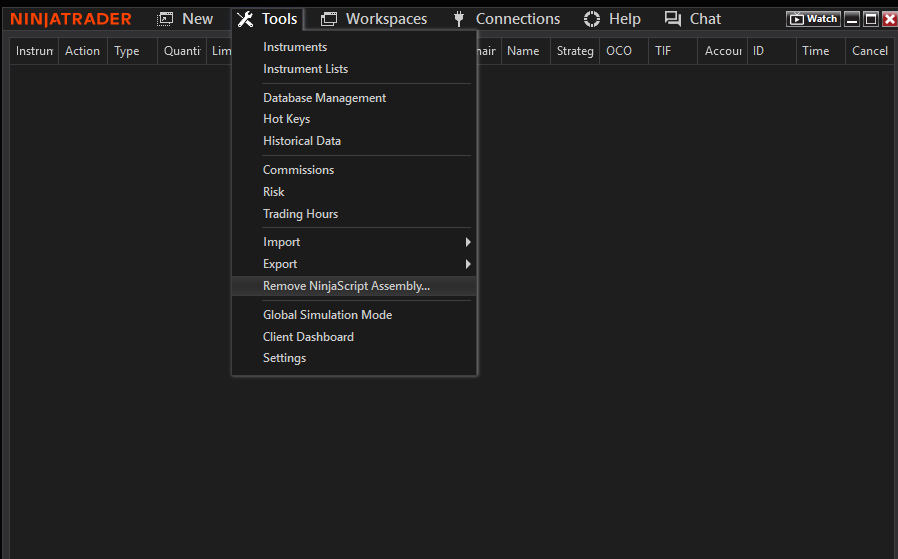
Tools/ Remove NinjaScript Assembly/ BOFMBO
and make sure you no longer have that file BOFMBO inside the folder Documents\NinjaTrader 8\bin\Custom
2) Please remove BOFMBO.zip from your downloads and from anywhere you previously saved the previous version. This file may interfere with the new file version if you do not properly remove it. Clean up the Recycle Bin.
#3) DOWNLOAD INSTALLATION FILES
Install new MBO DOM version 2 with Iceberg indicator
3) DOWNLOAD:
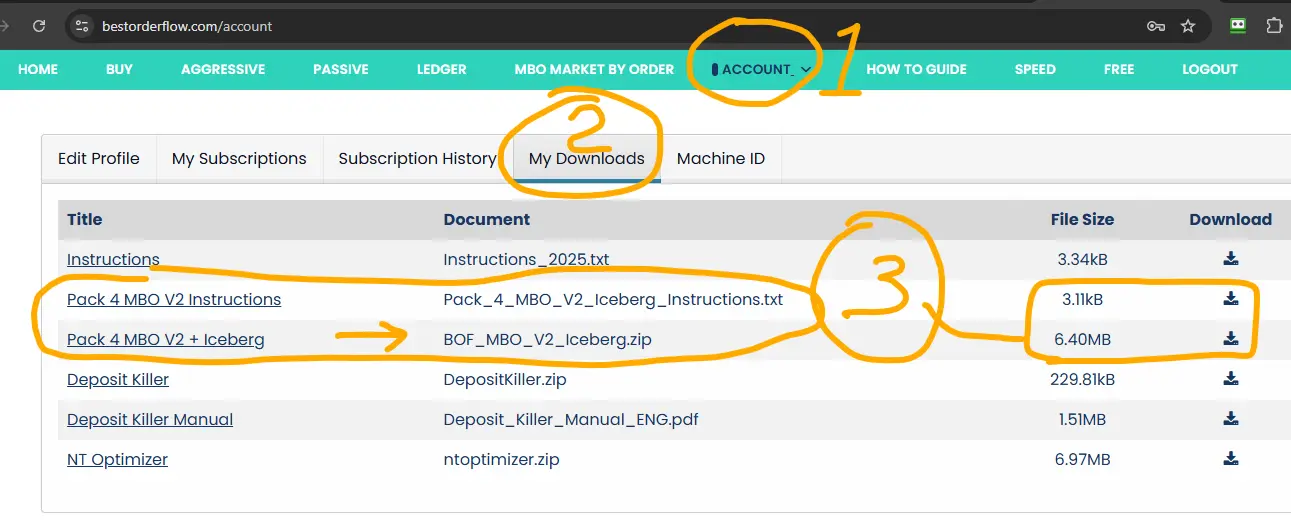
1) Log in to your Account on bestorderflow.com
2) Proceed to the My Downloads tab
3) Download file name: BOF_MBO_V2_Iceberg.zip
#4) INSTALL MBO INDICATOR FILES
Run NinjaTrader as Administrator.
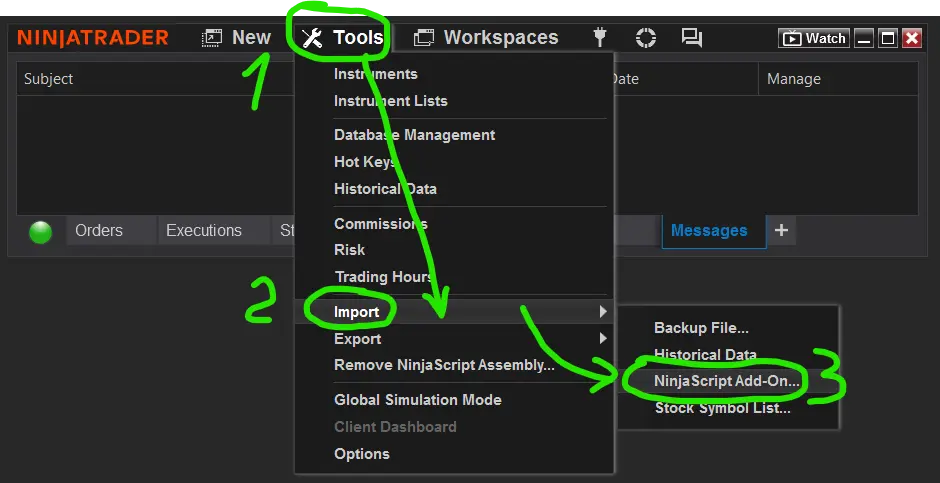
Install indicators via the NinjaTrader Administrative window: Tools/ Import/NinjaScript Add-on..
Select the file you have saved: BOF_MBO_V2_Iceberg.zip. Say yes to all questions.
4) Restart NinjaTrader. Run NinjaTrader as Administrator.
What do you do when you get a notification that you don't have a licence for MBO?
Follow the exact steps to fix it: How to Fix Licence Error Notification with NinjaTrader Username
#5) SET UP BOF MBO CONNECTION
For the best and fastest results, at first, remove all other connections from the list and keep only My BOF MBO Rithmic NT connection as proof that it works. Add other conecction AFTER BOF MBO Rithmic NT connection works. MBO Rithmic NT connection should be your primary connection
Notice: BOF MBO Rithmic NT connection is a copy of My Rithmic for Ninja Brokerage that is installed by default on your NT8.
The only difference is that our new connection is capable of reading MBO data properly. Some trades utilize these connections to integrate data from their prop firms' Rithmic providers. Example - Rithmic direct, Apex, or Bulenox.
6) Disconnect all connections: Administrative menu Connections/ Disconnect
7) Remove all connections from the list of connections. ( you can add them later - after you manage BOF MBO Rithmic NT to work)
7) Add new connection BOF MBO Rithmic NT:
- Menu connection/ Configure
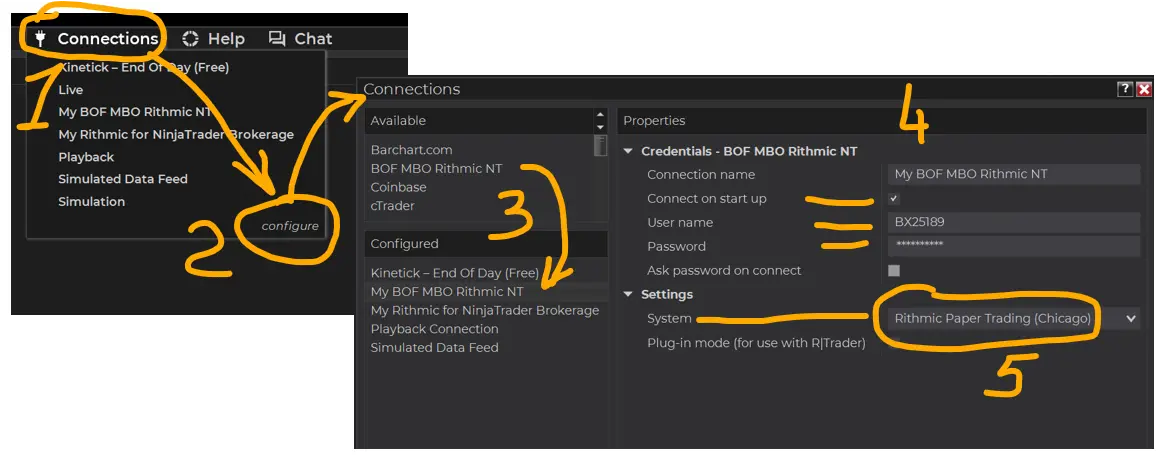
- Find a new connection under Connections/ Available: "BOF MBO Rithmic NT"
- Double-click to add that connection to the section Configured
- May select yes to Connect on startup later.
- Do not select any connection as a Plugin mode
- MBO data included in Data level 1. There is no need for data level 2 unless it is required for a Heatmap or other level 2 indicators.
- Fill out the same credentials Username and Password from your existing Rithmic connection, like Apex Bulenox or Rithmic Direct, used for data level 1 (copy username and password from the Rithmic connection Data level 1 already used). MBO data included in Data level 1.
On the Settings/ System/ select :
- Select Rithmic Paper Trading (Chicago) if you are in the United States and using Bulenox (as an example)
- for Apex accounts - select Apex from the list of servers. (not Paper Trading (Chicago)
If you are in another country, select the Rithmic Paper Trading server name that is closer to your geographic location.
Apply and OK
Turn on that connection from the menu Connection / BOF MBO Rithmic NT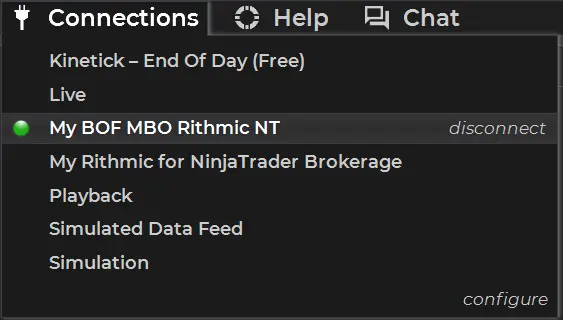
Always use the "BOF MBO Rithmic NT" connection to use on the MBO DOM and MBO Iceberg indicators.
Getting an error for the connection?
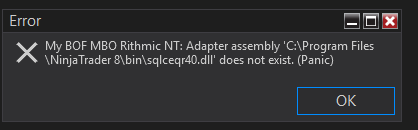
1) Please disconnect all connections. Remove all other connections from the list of connections ( you may add other connections later)
2) Turn on only My BOF Rithmic NT connection.
3) Configure this connection and add On for Connecting on Startup.
4) Most importantly: please double-check credentials for this connection - Username and Password for accuracy and save.
5) Restart NinjaTrader as Administrator.
Any other errors and notifications?
Most likely, all notifications may be solved by restarting NT as Administrator.
#6) ADD DATA TO INSTRUMENTS/TICKERS
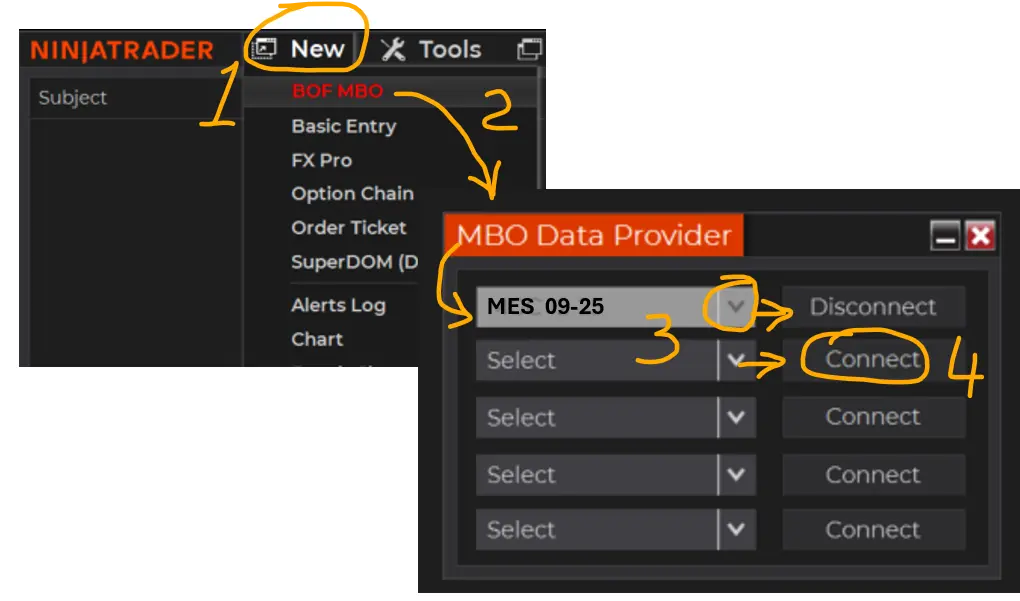
MBO DATA PROVIDER LIST:
- Select Tickers/Instruments to use with MBO :
- On the administrative window, select menu New/ BOF MBO. BOF MBO - red letters.
- On the MBO Data Provider window, select or type in tickers/ instrument names
(MES or MNQ) and press the Connect button.
- You may use up to 5 tickers to connect a maximum at the same time.
- Press X to close or _ to minimize the window. Your connection will not disconnect if you close that window.
#7) CLOSE ALL WORKSPACES
- Use the admin menu Workspace and close all workspaces.
- Make sure you also close any gray icon workspaces running in the background.
- It is essential that for the first time you use, you have confidence that MBO DOM and MBO Iceberg indicators work alone without interference with any other indicators or scripts.
Make a new workspace with a new name and close all other workspaces.
#8) ADD MBO DOM AND MBO ICEBERG ON THE CHART
Add a new 10-second chart MES or MNQ - the same as you selected on the New/MBO Data Provider list
Add MBO DOM and MBO Iceberg indicators on that chart.
For quick settings adjustments for MBO DOM, you can use the on-chart menu MBO, which should be highlighted in green for that instrument if you have selected it from the New/MBO Data Provider list.
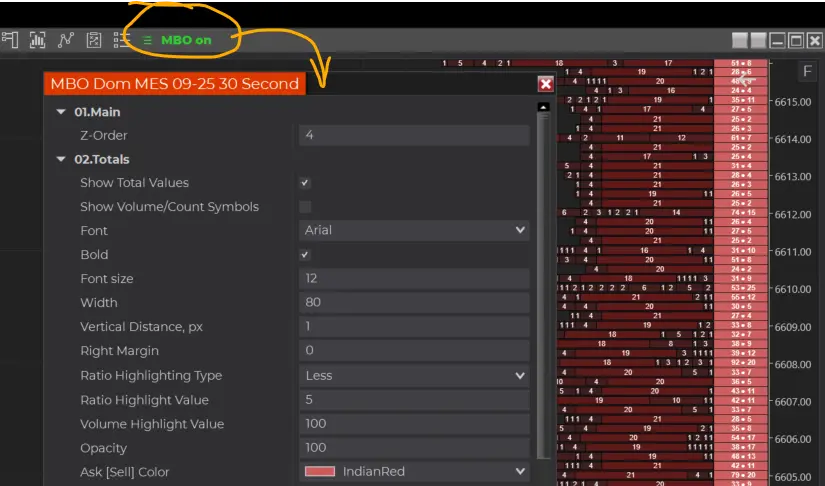
For complete settings for MBO DOM, use Indicators Configuration Properties.
Icebergs can be noticed on the MBO DOM and also on the Charts. Icebergs for the MBO DOM are configured in the DOM settings.
-------------------------
#2) UNINSTALL PREVIOUS MBO VERSION
1) Uninstall the previous MBO indicator via the NinjaTrader Administrative window:
Tools/ Remove NinjaScript Assembly/ BOFMBO
and make sure you no longer have that file BOFMBO inside the folder Documents\NinjaTrader 8\bin\Custom
2) Please remove BOFMBO.zip from your downloads and from anywhere you previously saved the previous version. This file may interfere with the new file version if you do not properly remove it. Clean up the Recycle Bin.
#3) DOWNLOAD INSTALLATION FILES
Install new MBO DOM version 2 with Iceberg indicator
3) DOWNLOAD:
1) Log in to your Account on bestorderflow.com
2) Proceed to the My Downloads tab
3) Download file name: BOF_MBO_V2_Iceberg.zip
====
COMMON MISTAKES:
1) The indicator files and connection disappear after working for a day before:
- It is deleted by antivirus and online protection software or Windows Defender. Whitelist NinjaTrader or uninstall all security apps/software.
2) Panic error:
- Restart NT as administrator. Do not believe the word Panic in the error message.
- Select the Ninjatrader app, right-click, and then select Properties/Advanced. Check the "Start as Administrator " checkbox.
3) Getting error " No valid licence" - please check Username and Machine ID entered on the account on this website correctly, exactly as shown in NinjaTrader / Help/ About and Machine ID window.
Before approaching the BOF administrator for any help and assistance, please consider the preparation steps:
1) Turn off all Ninjatrader connections
2) Close the NinjaTrader platform
2) Use NToptimizer to clean up cache and all recorded/written historical files and data with errors and hiccups. The NT optimizer is a free Windows application that can be downloaded from your account on bestorderflow.com.
3) Start NinjaTrader as Administrator
4) If you have MBO indicators, start BOF MBO rithmic connection as your primary and first in order connection. Other connections should be turned on as secondary later.
5) Reload Ninja Scripts on the chart
6) Reload data on the charts (F5)
7) Send BOF Admin a Direct Message on our Discord.
8) Always provide the BOF admin with your registered email and machine ID and a statement that you followed the troubleshooting instructions and preparation steps: My email is , and my Machine ID is 1234567.
9) Copy BOF Admin screenshots with errors. Errors can be fixed only based on a detailed description and screenshots.
==========
Most popular pack with bigger discounts:
Save 50% on any Lifetime packs with the coupon OCTOBER50
Lifetime Pack 1+2+3,
Lifetime Pack 1+2+3+4
Lifetime Single Packages
Single Packs - Explore each pack individually, without combining them with others.
Save 50% on any Lifetime packs with the coupon OCTOBER50
Lifetime Pack 1 - Aggressive Volume Indicators ( Footprint, Footer, Delta,
Lifetime Pack 2 - Passive Volume Indicators
Lifetime Pack 3 - LEDGER
Lifetime Pack 4 - MBO (MBOP Dom, MBO Iceberg, MBO Data Engine)
All lifetime indicators packs are here
Monthly/ Yearly/ subscriptions
Pack 1+2+3 Monthly
Pack 4 MBO Monthly / Yearly/ Lifetime
Try before you buy
Lifetime Pack MBO with other packs:
Save 50% on any Lifetime packs with the coupon OCTOBER50
Lifetime Pack 4 MBO + Pack 1
Lifetime Pack 4 MBO + Pack 2
Lifetime Pack 4 MBO + Pack 3
Pack 1_ 2
2-Pack bundle 4 Plans
Combi2 Packs Bundle OCTOBER50 coupon for 50% discount on any two packs bundle
3-Pack bundle 3 Plans
3 Packs bundle - OCTOBER50 coupon for 50% discount on any 3 Packs bundle
4 Pack bundle 1 Plan
4 Packs bundle -OCTOBER50 coupon for 50% discount on the four packs bundle
MBO 2 Plans
MBO Pack -OCTOBER50 coupon for 50% discount for LifeTime Pack
Monthly 1 Plan
Monthly Subscribe-To-Own
Trial 1 Plan
Try free and subscribe monthly, yearly or lifetime subscription
| Pack Name | Lifetime | With coupon OCTOBER50 |
Monthly | |
| Pack 1 -Aggressive Volume Indicators | regular $1500 Now $750 | $750 | ||
| Pack 2 - Passive Volume Indicators | $1500 | $750 | ||
| Pack 3 - LEDGER | $1500 | |||
| Pack 4 - MBO | $1500 | |||
/////---///
RESULTS BY COMMUNITY USERS
Taken from BOF Telegram and Discord community.
abrahamvthomas
Verified user
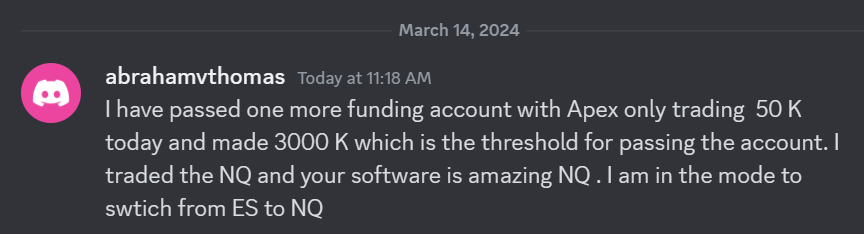 I have passed one more funding account with Apex Trading today and made $3,000, which is the threshold for passing the account. I traded NQ, and the Bestorderflow indicators are excellent for passing props.
Garban
Verified user
The MBO Market By Order indicator displays liquidity in real-time. Now I can see if a Support or Resistance Level can hold or become weak.
Fortunate
Verified user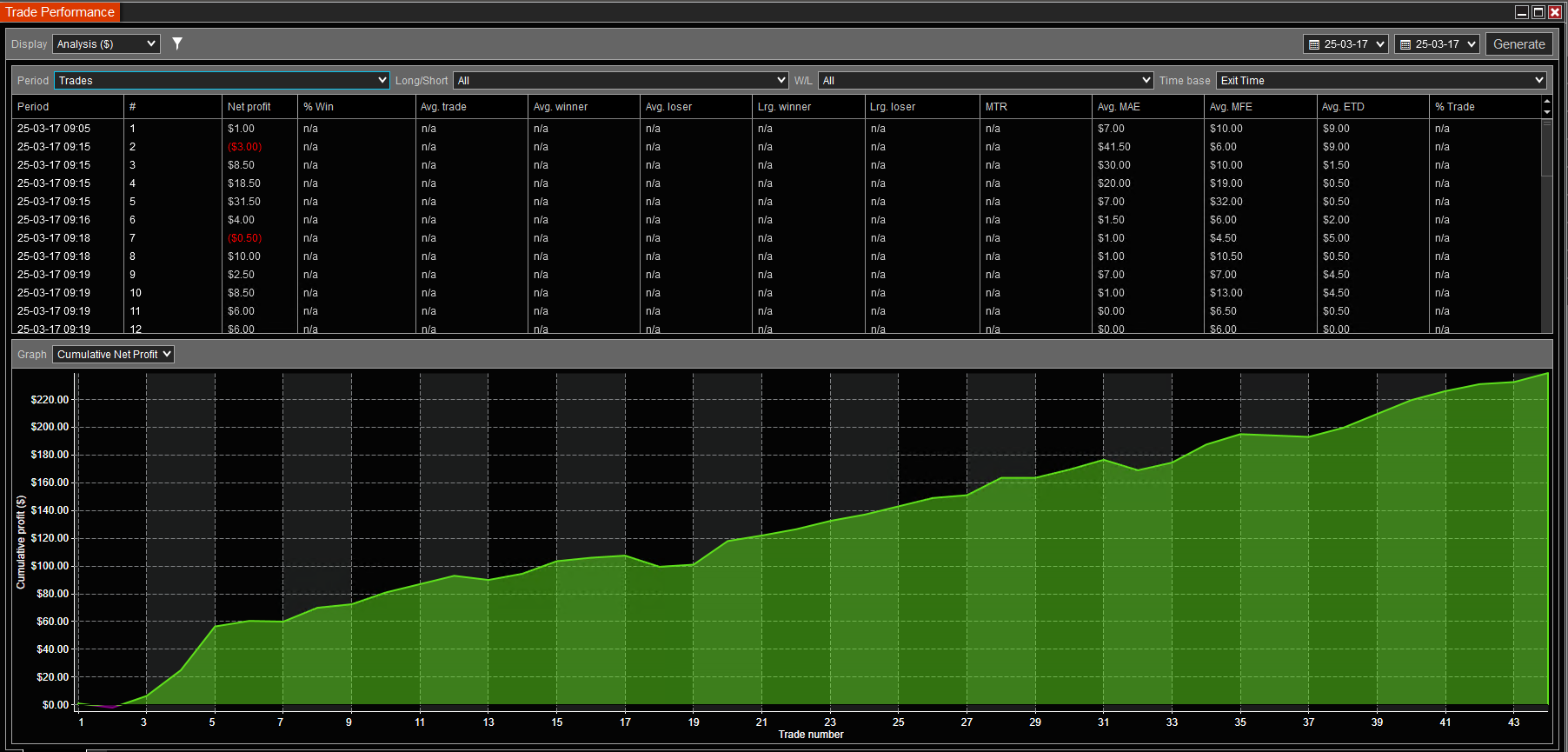
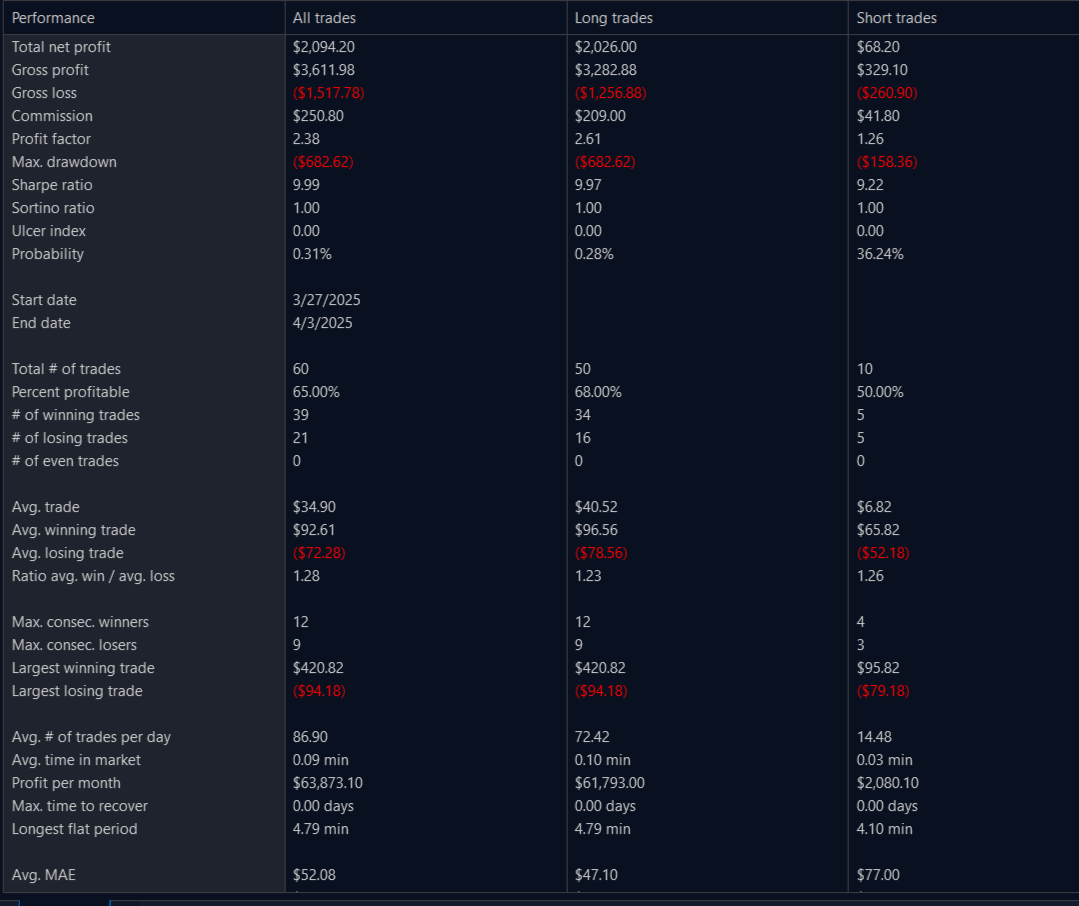
5minutes of trading 1305-1310 GC ES NQ 15s chart with MBO max DCA 2 contracts open. Done for the day
Leandro
Verified user
I have tested and used indicators from many other vendors. The BestOrderFlow indicators are the best set of indicators for the NinjaTrader platform. It is lightweight and presents information in a visually appealing manner. That makes a lot of difference in my trading. I love to trade with MBO Market by Order indicator. Feel free to connect with me, and I can provide you with hundreds of screenshots of my results, if you'd like.
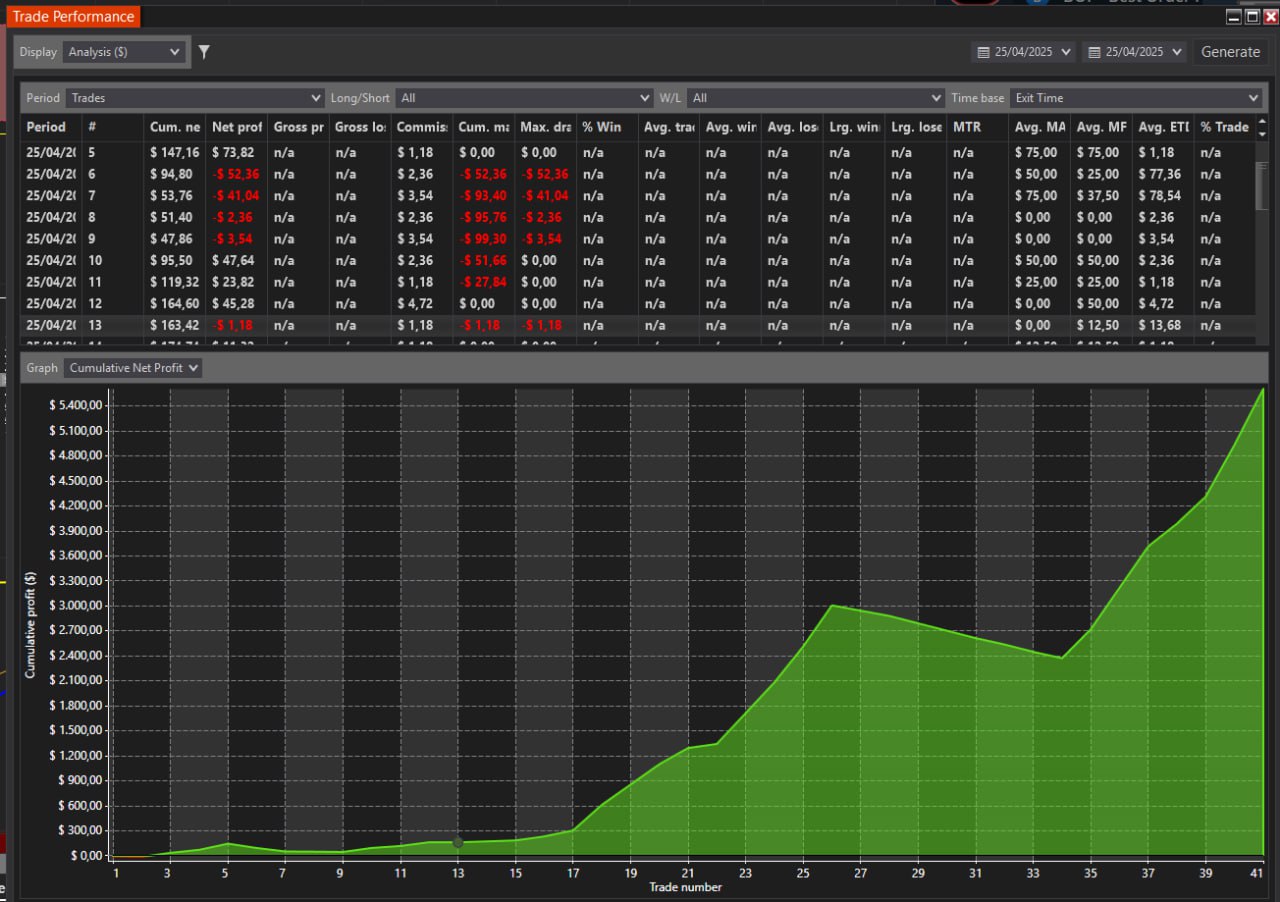
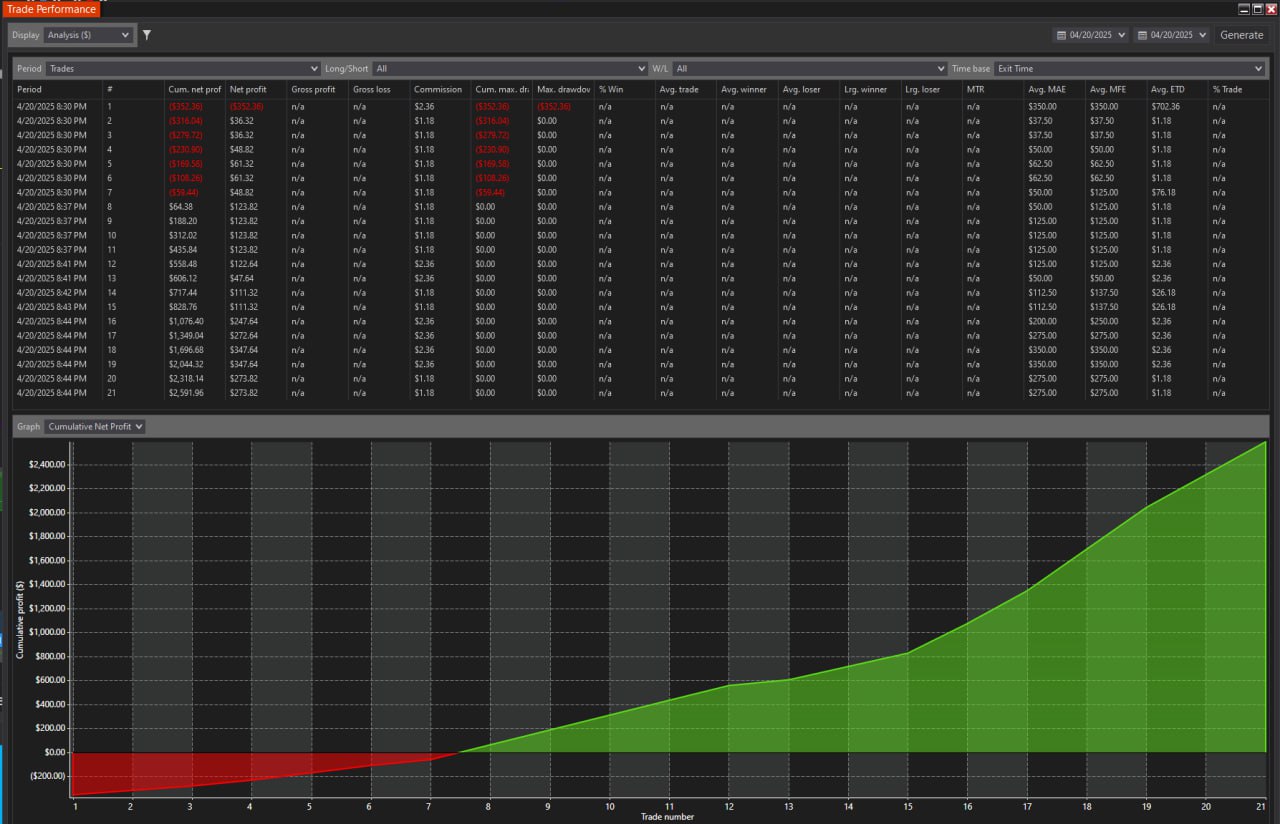
Game Changer for my Results
As an active trader, I can't say enough good things about the BestOrderFlow Delta Level 2 indicator. This set of indicators gave me an edge in my trading. It's like having a crystal ball for market movements! The way it tracks the speed of buyers and sellers is incredible. I love how it shows who is dominating the market in real-time, which helps me make informed decisions quickly.
Whether it's spotting a reversal or riding the momentum, this indicator has been a game-changer for my scalping strategy. The visual cues are straightforward to understand, and the ability to adjust settings based on different trading sessions is a significant advantage. If you're serious about trading and want that extra edge, this indicator is a must-have. Big shoutout to BOF Admin support and the team for making charts so easy to use and keeping NinjaTrader with BOF indicators super fast and responsive! Your work has truly made a difference in my trading experience. Thanks a ton!
Fortunate
DM me on Discord for any questions. and see my results.
Verified user.
Dan Alec
Verified user
Feel the Difference
I am a trader with over 6 years of experience trading volume indicators on NinjaTrader. Other third-party vendors that sell indicators for NinjaTrader are known for their poor quality and the difficulty of using their indicators, which can cause charts to become slow and sluggish.
I no longer use any other third-party indicators, except BestOrderFlow (BOF). BOF indicators are made professionally, and you can instantly feel the difference.
Charts with BOF indicators run much faster and never freeze.
BOF has several simplifications over its competitor's footprint, which I appreciate. It is not only lightweight, but it just works flawlessly.
BOF tutorials and educational videos are very informative and helpful.
Regarding charts with BOF indicators, I appreciate how the information is organized and visually presented on the indicators.
Welcome to connect with me on Discord.
Momentum trader
Verified user
Unparalleled Quality and Speed
I have been testing BOF indicators for two months and getting shocking results. I am thrilled and excited as never before to trade. I am honest and have no financial incentives to influence my expression.
This Footprint is incredible. This Footprint indicator uniquely combines several other indicators, offering unparalleled quality and speed.
It's a testament to the programmer's expertise behind it, and I hold it in high regard. Yes, I am deadly serious in my feedback on using these indicators.
My primary motivation for writing about BOF indicators is my sincere desire to help traders grow their accounts faster. I have tested and used many indicators from other well-known brands and found that BOF indicators perform more efficiently, providing a significant advantage in trading.
Ed Garcia. 2025
Verified user.
My favorite indicators
I fell in love with BOF indicators from the very first day of use, and I highly recommend them to any trader.
I traded the S&P 500 and Nasdaq for 4 years and used BestOrderFlow indicators for 12 months.
Through the use of BOF indicators, I achieved a significant improvement in my trading results.
The visual presentation of the complex data provided by bestorderflow indicators helped me to make my entries and exits much faster and safer than ever before.
Charts with BOF indicators run much faster and are very informative. In my day trading, I use BOF Footprint, Market Speed, Delta Profile, Pulling and Staking on Dom, Heatmap on the past Dom.
I use BOF video tutorials and PDF manuals to set up each indicator the way I need for my trading setups.
Please feel free to contact me if you have any questions.
Dan
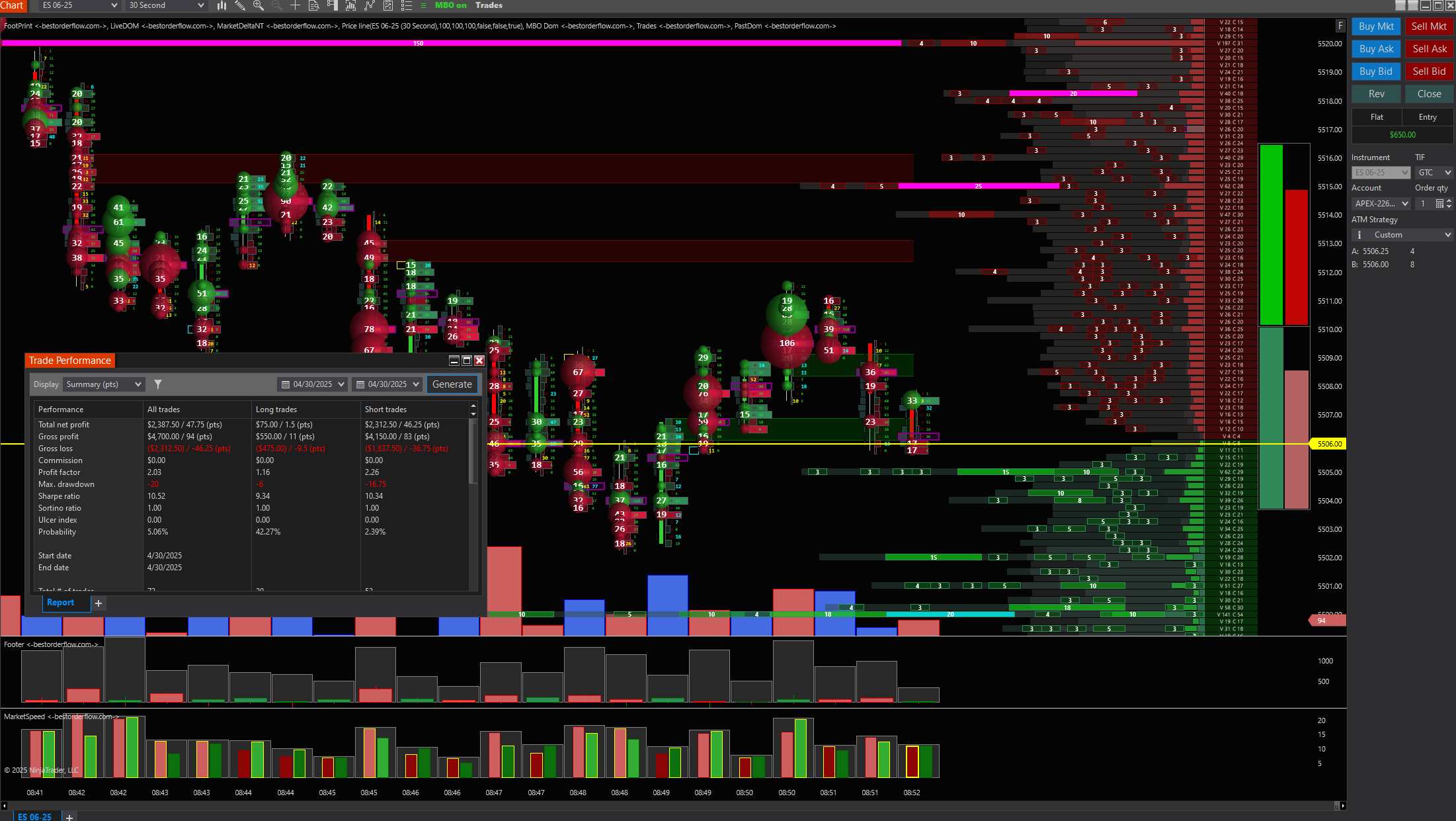
2.03 profit factor for me today for my morning session, I'm on an Apex eval account. The goal is to practice and build it up slowly, not go on tilt, learn & get better. On the next day, I took 11 trades 4.69 profit factor on an eval
abrahamtomas
I have passed one more funding account with Apex Trading today and made $3,000, which is the threshold for passing the account. I traded NQ, and the Bestorderflow indicators are excellent.
Fortunate 3:
yesterday and today combined. 1h total trading time on MNQ with MBO (edited)
Ollie James Hales A and B
Getting the hang of the system. Trying to make sure I understand direction before playing the MBO levels
[5:50 AM]
But so far so good .
Loving this software!!! - _Image C
Image Ollie 4
GARBAN:
Pure MBO play
Pure MBO play
Image_Garban 1
---/// АЩКЕГТФЕУЖ
5minutes of trading 1305-1310 GC ES NQ 15s chart with MBO max DCA 2 contracts open. done for the day  (edited)
Image name: Fortunate 5 MIN
LYRANA
2.03 profit factor for me today for my morning session, I'm on an Apex eval account. Goal is to practice and build it up slooowwwlly, not go on tilt, learn & get better
Image: LYRANA_1
LYRANA
Today I took 11 trades 4.69 profit factor on an Apex eval:
Image: LYRANA_2
Some User
Hi Oleg. Everything is fine with the new version of BOF... Awesome. I'm intrigued to learn about and try all the improvements. The installation is quite simple
Qubit:
Hi Oleg, everything is running really smooth and fast chart response. Simple installation. Excited to learn level 2 trading.
Mauroicio samour
Realy nice order flow, so fast and easy to rea,d thanks
Fortunate:
As an active trader, I can't say enough good things about the BestOrderFlow Delta Level 2 indicator. This tool has genuinely given me an edge in my trading. It's like having a crystal ball for market movements! The way it tracks the speed of buyers and sellers is incredible. I love how it shows who is dominating the market in real-time, which helps me make quick decisions. Whether it's spotting a reversal or riding the momentum, this indicator has been a game-changer for my scalping strategy. The visual cues are super easy to understand, and the ability to adjust settings based on different trading sessions is a huge plus. If you're serious about trading and want that extra edge, this indicator is a must-have. Big shoutout to Oleg and the team for making orderflow so easy to use and keeping NinjaTrader super fast and responsive! Your work has truly made a difference in my trading experience. Thanks a ton!
MOMENTUM:
This Footprint is incredible,
" This Footprint is incredible. This Footprint indicator combines several other indicators in a unique way, offering unparalleled quality and speed. It's a testament to the programmer's expertise behind it, and I hold it in high regard. Yes, I am deadly serious in my feedback on using these indicators. The price is fantastic as well. I have been testing BOF indicators since Sunday and getting shocking results. I am thrilled and excited as never before. As far as I know, BOF is inventing new indicators. This is my opinion; I am honest and have no financial incentives to express myself. My only reason to write about BOF indicators is my earnest desire to help traders grow their accounts. BOF indicators are an excellent advantage for concurring markets and staying profitable."
DELETED old ED GARTCIA
I started swing trading in forex 5 years ago and Futures intraday swing trading 4 years ago. I always preferred the SP500 because it is less volatile than Nasdaq I have been using BOF for 6 months and this suite of tools has allowed me to safely navigate my experience with the Nasdaq. The quality of the information I get, the speed and versatility on the chart are virtues that help me significantly in making decisions. On a couple of occasions I had latency problems but they were quickly resolved with some suggestions made by Oleg. I use Footprint, market speed, delta profile, pulling and staking on Dom and, past Dom basically. For the Nasdaq I focus on intraday swing relying on the Delta profile and for scalp I rely heavily on the past dom, footprint and P&S.. I Use the BOF educational videos to better understand the use of each tool but not to apply suggested strategies. Basically I found BOF to be a powerful tool when it comes to displaying information and one of the things that helps me the most is the ability to keep the information at high compression levels. I have had no hesitation in recommending its use and I hope to continue seeing significant progress in the next updates. Here is one of several videos on my YouTube channel where I share my trading activity using BOFYou can write to my telegram with any questions about BOF and I will gladly do my best to resolve them.. https://t.me/EdGarciaCap https://www.youtube.com/watch?v=X25wJ6xg3eU&t=15s
You can contact @EdGarciaCap right away.
DAN:
1) I've just completed 6 years since started self learning financial markets. I consider myself a self taught quant. 2) I'm since the very start, around December of last year. It's been almost a year... 3) Everyone that uses NT8 knows the pain of using slow addons. And BOF has never ever freeze my charts. Comparing to other third parties, BOF is such refined and polished product. Since I've started NT8, it is been a very tortuous and difficult path to learn all the perks of this platform. It was very frustrating at the beginning, specially if you try to synergy all third party addons... BOF has many simplifications over competitor's footprint which I really like. It is just not only lightweight, it just works flawlessy with my other existent addons. And this was fundamental to incorporate in my platform. Actually I don't use much bookmapNT but I cannot live without the footprint. I really like the tracking aggressiveness using BOF's footer and it gets difficult to trade without it. I only understood BOF suite after some months using it. In the beginning I was really confused why the suite was built like this. I think that talking and having the programmer's perspective was essential to believe in Oleg's transparency. Mr. P. is such talented software engineer. I had a such good time exchanging information about BOF.
- 4) I use BOF mostly for daytrading. I cannot say I'm a scalper but I really like to grab momentum based entries over gamma trading. My trading is based on Lotka-Volterra models. 5) I'm glad that people have opportunity to access high quality information avoiding this mass of scammers out there. BOF videos are very informative and transparent. Although it feels like listening spurt from a boomer, there are many hidden gems in Oleg's words. 6) I really like how the information is organized and displayed using BOF. If you are still on your way to master market concepts like delta. BOF will help you a lot. 7) N.D.A. sorry. 8) I don't have a channel yet but my username is @ danalec I've just bought a camera so I'll eventually record some stuffs and post into my social networks... Time is very precious and scarse. Mr. Oleg is very busy but has an empathetic heart. The light of Christ certainly illuminated his path, may He continue to bless him. 9) Permission of use my words are granted. Dan Alec Y. 2024 10) I declare that my words are true. (edited)

- 1

- 1
OLD ED GARCIA account:
Best order flow is a powerful tool for any trader who knows how to understand price behavior. @BOF Admin did awesome work. It is not enough to know what an iceberg, abs, imbalance, etc is. We must know what the price tells us through these events at a given price. Stas shows very well how you can use BOF... that you don't see the chart, that the videos are cut, that is not real account etc... use a demo and try to do what Stas does for 10 min...then You come and tell us. distrust is good but asking and learning is better
GEKKO
London session. I like BOF for confirmation. trying to implement live dom/past dom to my strategy, but even just with big trades its really good. Can see if possible reversal coming due to reaction of levels and what Big traders do. Have also other screen shots of entry of order, as BOF for confirmation
FORTINATE MBO EVAL images or #results
Fortunate 81% profit rate Image :
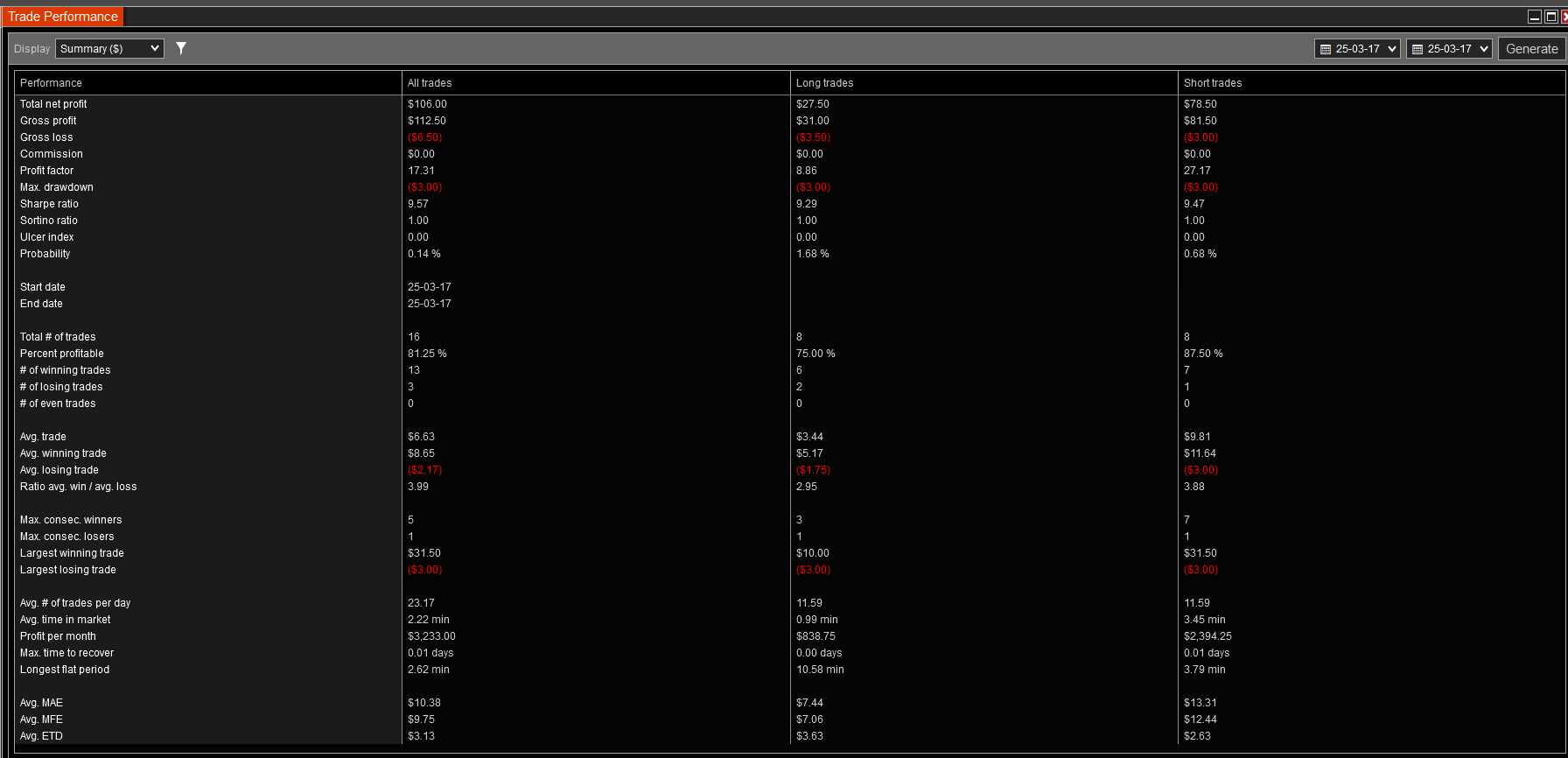
MNQ on 15 seconds chart with only MBO on charts made in 30m during live BOF webinar before market open. Apex PA account. only limit orders for entry. at times market exit or stop order exit (if in profit). DCA was used. if each DCA trade is traded as one trade it was a 100% win rate. $3 usd Drawdown (edited)
aaa
bbb
LEDGER- PACK 3 INDICATORS LIST
- Pack 3: The LEDGER package utilizes data level 2 for the HeatMap NT and PriceLinesNT
The heatmap NT is our new and extended version of the well-known Heatmap charting software for traders.
- Heatmap Advanced indicator for NinjaTrader
- Advanced filters
- Remove Market Maker
- Remove bots
- Super fast speed and performance
- PriceLinesNT indicator for NinjaTrader - level 2 data
- Market Delta bubbles Indicator for Ninjatrader
bbbbbbbb
bbb
vccccc
aa
AGGRESSIVE VOLUME INDICATORS
PACK 1 RESOURCES:
bbb
CC
Read the full version on our Discord community
Momentum Scalping:
" This Footprint is incredible":
This Footprint indicator uniquely combines several other indicators, offering unparalleled quality and speed.
Yes, I am deadly serious in my feedback on using these indicators. The price is excellent.
My success story with the BOF indicators is a testament to their effectiveness. I've been testing them since Sunday, and the results have been shocking.
This experience has left me thrilled and excited like never before, and it can do the same for you.
Let me make it clear that this is my honest opinion. I have no financial incentives to express myself; I'm simply sharing my experience with the BOF indicators.
My only reason for writing about BOF indicators is my earnest desire to help traders grow their accounts. BOF indicators are an excellent advantage for staying profitable in modern markets."
Read the full version on our Discord here: https://discord.com/channels/1201715826139615342/1217905186131939408.
Den Garsia
Here is why I highly recommend trading with BOF indicators:
I started trading in forex 5 years ago and Futures intraday trading 4 years ago.
I have been using BOF indicators for 6 months, and this suite of tools has allowed me to navigate my experience with the Nasdaq safely.
I like quality information, speed, and versatility in charts. Charts with BOF indicators significantly improve my trading.
My favorite indicators are Footprint, Market speed, Delta profile, Pulling and stalking, and Past and Live dominance.
I appreciate BOF user guides that help me to understand how to set up and use indicators.
I found BOF to be a powerful tool for visualization and presenting complex information in an easy-to-understand way. I highly recommend trading with BOF indicators.
Please don't hesitate to ask me any questions: Telegram: https://t.me/EdGarciaCap
Youtube: https://www.youtube.com/watch?v=X25wJ6xg3eU&t=15s
Dan ( short version)
@Oleg Mart, I'm just writing to thank you.
The pigtail pattern was a great addition to the footprint trading style. Thanks for explaining it concisely and sharing your knowledge. I've grabbed a massive ~58pts single long movement back to swap today—great pattern!
I have been trading for 6 years.
Everyone who uses NT8 knows the pain of using slow add-ons. My charts with BOF indicators never got frozen. BOF is a refined and polished product compared to other third-party indicators I have used. It has many simplifications over competitors' footprints, which I like.
I cannot live without the BOF Footprint anymore. I use BOF primarily for day trading. I cannot say I'm a scalper, but I like to grab momentum-based entries over gamma trading.
BOF videos are very informative and transparent. I like how the information is organized and displayed using BOF. BOF will be beneficial if you learn to use market concepts like delta and footprint.
Read the full version on Discord: https://discord.com/channels/1201715826139615342/1217905186131939408/1283136337427431464
--===///=== From Category description
LEDGER
PACK 3 NEW HEATMAP INDICATORS LINKS
Links for PACK 3 NEW HEATMAP Indicators open in a new window:
- Pack 3 NEW HEATMAP indicators for NinjaTrader
- NEW HEATMAP indicator for NinjaTrader
- Market Delta bubbles on Heatmap Indicator for Ninjatrader
- PriceLines on NEW HEATMAP indicator for NinjaTrader - level 2 data
Pack 3: The LEDGER package utilizes data level 2 for the HeatMap NT and PriceLinesNT
Ledger is a new version of the well-known Bookmap charting software for traders.
What is the difference between Bookmap and LEDGER?
What is the problem with the commonly used Bookmap software? Here are the Pros and Cons for Bookmap ( not this website)
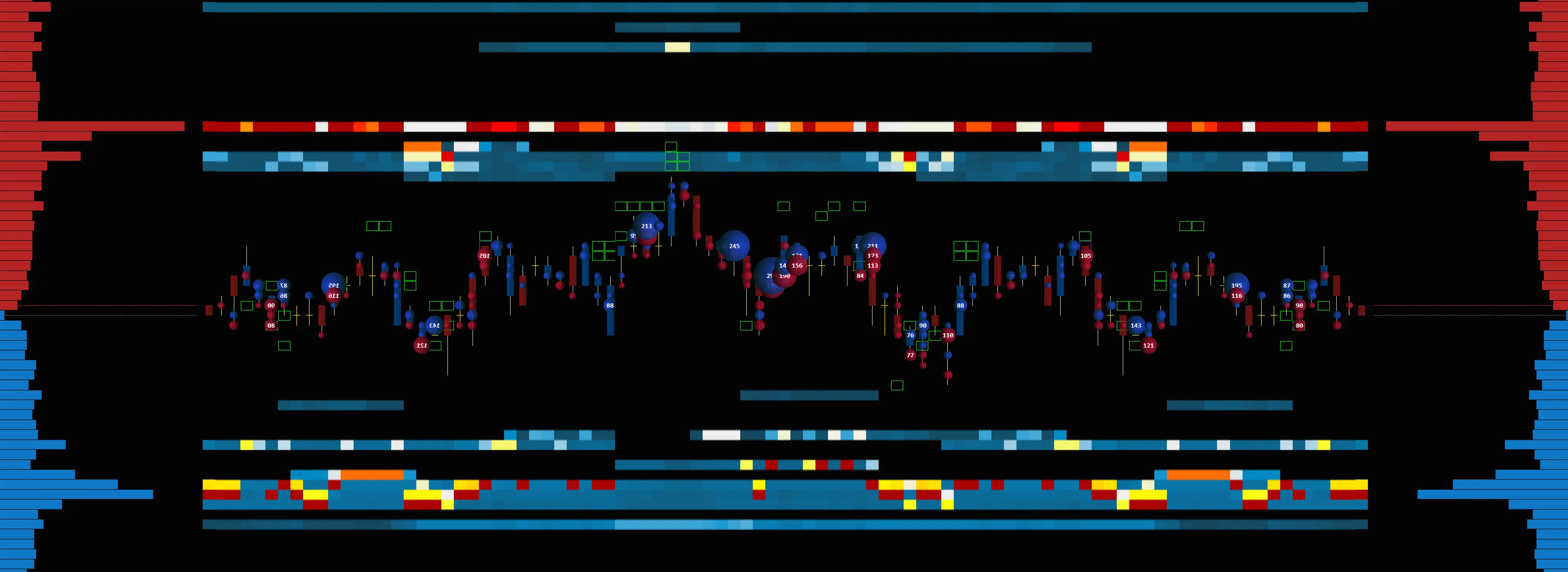
Bookmap Cons:
- no longer unique and effective for scalpers
- outdated visualization
- Incorrect iceberg detection
- lack of traditional charting options
- not naturally integrated with NinjaTrader or any other platforms
- Hard-to-clean charts
- very primitive Dom
- lagging charts during high volatility
LEDGER, formerly known as Bookmap NT, is a new and redesigned version designed to address the shortcomings of Bookmap for traders.
Here are the advantages of LEDGER formerly Bookmap NT:
LEDGER PROs:
- New and Advanced: LEDGER Bookmap NT is a newer and more advanced version
- Direct Use: It is now used directly on the NinjaTrader chart.
- Integrated: LEDGER Bookmap NT is naturally integrated with any other indicators: Footprint, VWAP, Cumulative Delta, Volume Profile, Delta Level 1, and Delta Level 2,
- Visualization: improved to a new level
- Filters: for crispy, precise visualization and clean-up charts from tunnels and market makers
- Speed: Is it the fastest in the industry in terms of heatmap performance during high volatility time.
- Liquidity - enhanced liquidity and magnets filters
HEATMAP NT
Heatmap NT is an advanced heatmap
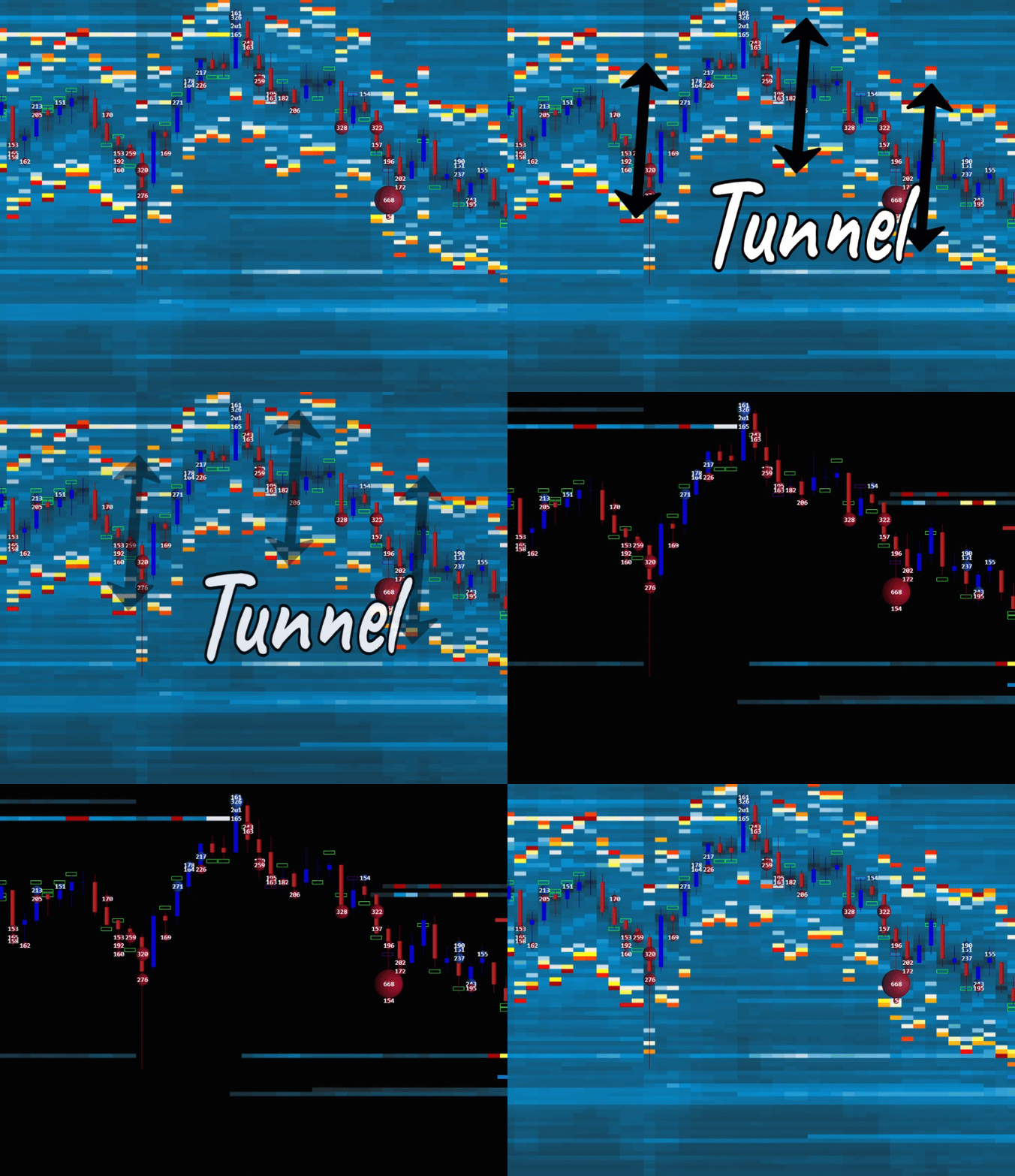 What is Advanced Heatmap NT:
Heatmap NT displays historical records of passive resting limited orders, represented by time and colors. Heatmap NT displays liquidity and helps identify the strength of support and resistance price levels, as well as support and resistance zones.
Heatmap filters help to display immediate liquidity magnets for scalping and precision entries.
There is a lot of noise and insignificant volume orders on the ES that create a "tunnel" effect, which is impossible to remove on the Bookmap. Now you can easily remove unwanted Market Maker noise with advanced filters on our Ledger Heatmap. This is an advanced feature not available on any other Heatmap indicators.
1st USE HEATMAP RECOMMENDATIONS
1) Ensure you have a connection to the Level 2 data.
2) Close all charts. Start a new NQ or ES chart on a 1-second timeframe
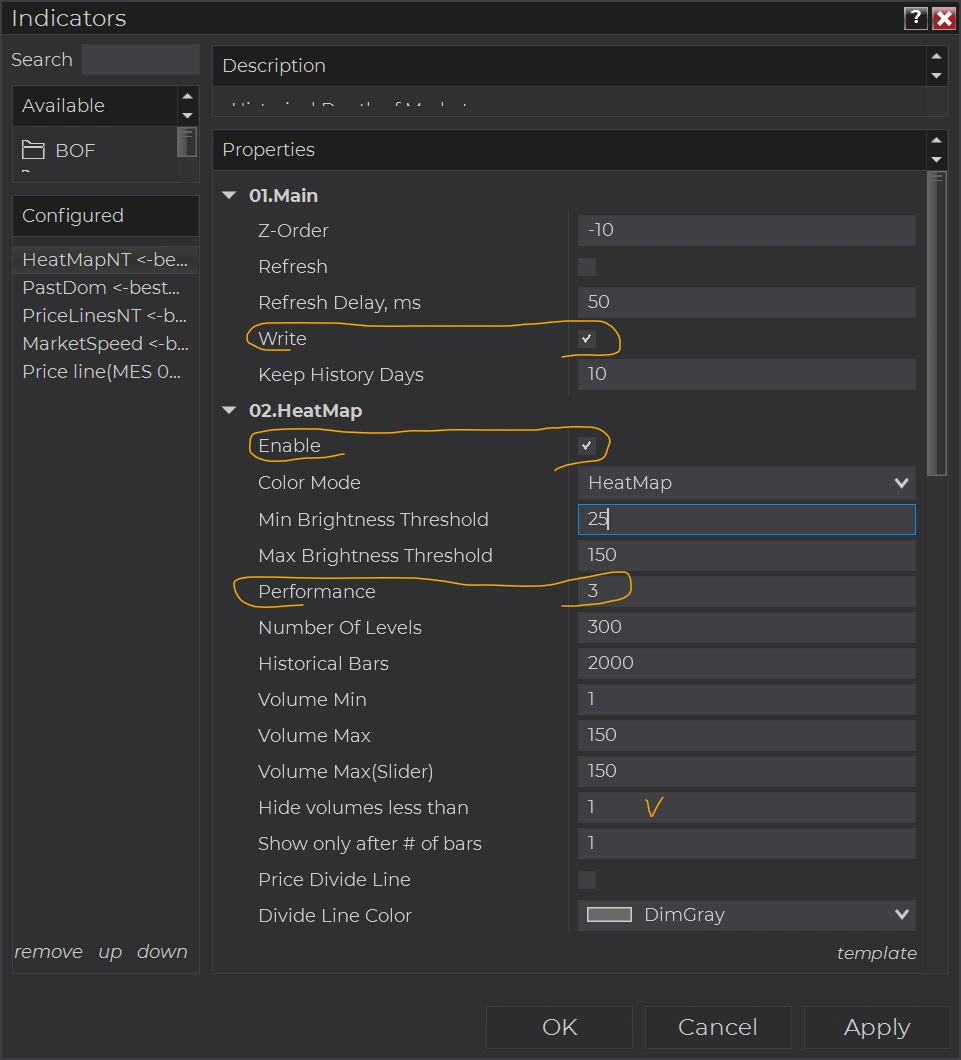 3) Ensure that Tick Replay is enabled in the Data Series.
4) Add Heatmap NT on the chart . Use default settings: Volume Nin = 1, Hide volumes less than = 1, Ahow only after # bars= 1
5) Check the 'Write' box if you want to keep the historical Heatmap.
6) Use three or fewer days to keep history
7) Set performance to 3 or 4 for less load on your computer's CPU. Setting performance to 1 produced crisper price levels, but it also increased the load on your CPU.
8) Option 02. Heatmap "Enable" - does not impact the option, Wright.
Option "Enable" - makes the Heatmap visually perform on that chart.
The "Enable" option can be disabled on the chart to conserve computer resources.
For example:
Use 1 chart to trade with options. The "Write" option is disabled to conserve resources. Option "Enable" is ON.
The 2nd chart with the same timeframe and ticker as on 1st, used only to "Write" historical Heatmap without any interruptions. Check "Write" and Uncheck "Enable".
Refreshing the 1st chart with F5 or closing the 1st chart will not interrupt the historical recording of the Heatmap on the second chart.
Market Delta indicator:
- Market Delta represented by bubbles, uses level 1 data. This indicator is similar to a Big Trades indicator. Big Trades display the volume of trades, but the Market Delta displays the winning side of that trade by delta. The total volume of that trade can be large, but it is unable to move the price and does not indicate a stronger side. Market Delta displays immediate results of interaction between orders on level 1 and level 2 - between aggressive and passive sides of the market as a delta (difference) in the moment of that transaction. The delta shows the stronger side of the market.
Market Delta can recalculate bubbles in real-time. As soon as you make chart adjustments, it adjusts its bubbles to the optimal size and view. There are two modes of recalculation, and this is an advanced feature of BestOrderFlow that is not available on any other "similar-looking" indicators.
Market Delta indicators are significant for visualizing absorption and multiple absorptions.
Market delta bubbles can be merged using two merging modes, allowing the chart to be fine-tuned for optimal readability and instant analysis.
PriceLinesNT
What is the PriceLinesNT advantage over other price lines?
The advantage of the PriceLineNt becomes obvious when trading on a millisecond time frame, particularly with high-frequency trading and script automation.

PriceLinesNT keeps the bid and ask at every point of price movement intact.
PriceLinesNT is based on Level 2 data and displays close-limit orders that are ready to be triggered by aggressive market orders. The best buy can be entered as Buy by Bid, and the best Sell can be entered as Sell By Ask. That gives an advantage over entering the Buy Market and Sell by Market.
The history of PriceLinesNT can be recorded, and entries and exits can be analyzed for further insight. PriceLinesNT is an excellent addition for scalping with granular precision.
LEDGER PRESENTATION
Watch the presentation about Indicators from Pack 3 on the main menu LEDGER https://bestorderflow.com/bookmapnt
PACK 3 LEDGER STRATEGIES:
Strategies used with indicators from the LEDGER ( formerly Bookmap NT) in combination with other bestorderflow.com indicators
VIDEO + PDF MANUALS AND INSTRUCTIONS
Manuals / Instructions / Explainer about how to set up Heatmap, Heatmap Filters, Market Delta
Compare the old Bookmap and new LEDGER from bestorderflow.com
2
Video 1: Step By Step Tutorial - how to set up and tune Heatmap on any timeframe and any instruments.
Video 2:
Russian language Heatmap User Manual Play List link